Orders arrived on a form, stock travelled by spreadsheet, and every decision was made from a sheet that was already out of date. We stopped patching that and built the system underneath it.
Role
Acting CTO — architecture, build, rollout
Timeline
2023 – ongoing
Stage
In production · eight modules, used every day
Outcome
One system of record instead of a spreadsheet per person
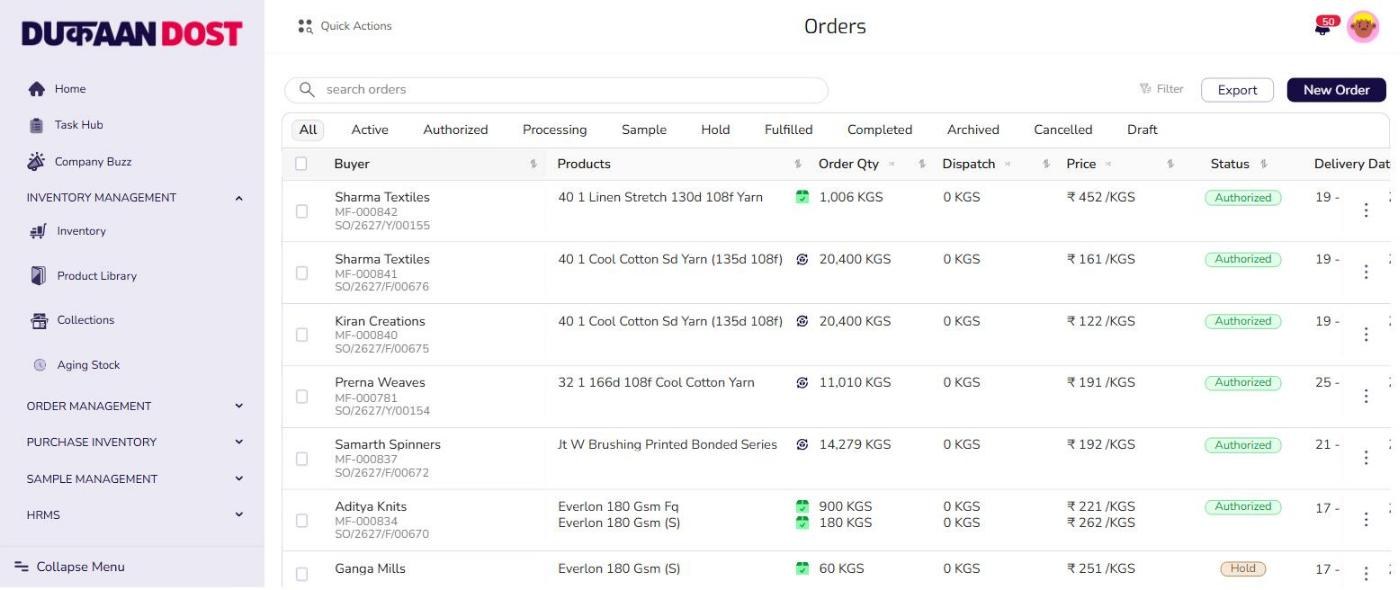
Every order in one place, carrying its own state — buyer names and prices replaced for publication
The problem
Nobody was short of data. Everybody had their own copy of it.
An order started life as a Google Form. It landed in a responses sheet called Fabric Orders, and an accountant opened that sheet to work out what it meant. Stock lived the same way: a sheet was prepared and sent out to whoever needed it, so the warehouse, the sales floor and the accounts desk each held a different file with a different idea of what was in the building.
None of this was carelessness. It worked, in the sense that the business ran on it for years. What it could not do was answer the same question the same way twice. Two people reading two copies of the stock sheet would price an order differently, and both could point at a file that agreed with them.
The decisions were the expensive part. How much of a quality was left, which buyer was overdue, what had been sitting in the warehouse long enough to worry about — all of it was worked out by hand, by someone reading a sheet, and the sheet was always older than the question.
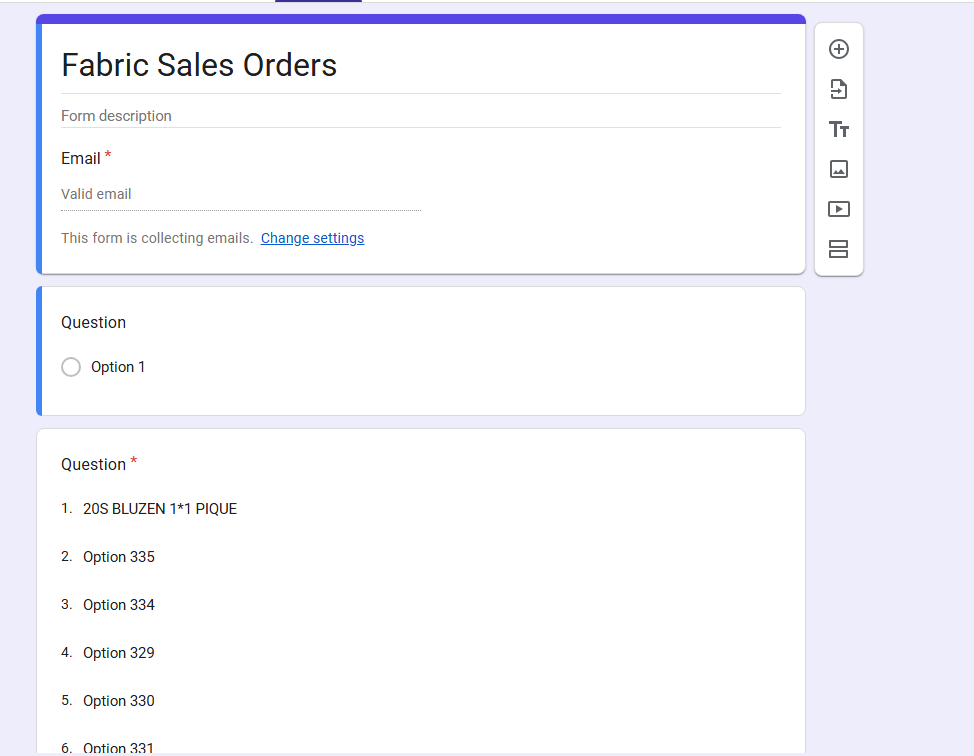
Where an order began — a Google Form, and a product list that had grown to option 335
One copy
of the stock sheet per person, each already stale
By hand
every reconciliation between the sheet and the floor
No history
a spreadsheet overwrites; it does not remember
What shipped
Before, and after
01
Order entry
A structured form that validates as you fill it
A paper form, then a retype
02
Stock
Live, down to colour and roll
A spreadsheet, emailed out
03
One truth
One record everyone reads
A file per person
04
Decisions
19 reports, generated
An accountant and a sheet
05
Excel
Reconciled against the database
The system of record
06
History
Every change attributable
Overwritten, silently
The decisions
What got chosen, and what got refused
The direction I killed — one more spreadsheet
The first proposal was the reasonable one: keep Excel, add structure to it, share it properly, lock the cells people kept breaking. It was cheap, everyone already knew how to use it, and it would have held for about a year. I killed it because it left the actual problem untouched. A spreadsheet has no idea who changed a number or why, and once two people hold copies there is no way to tell which one is wrong. Every version of that plan ended with somebody reconciling files by hand, which was the thing we were trying to stop doing.
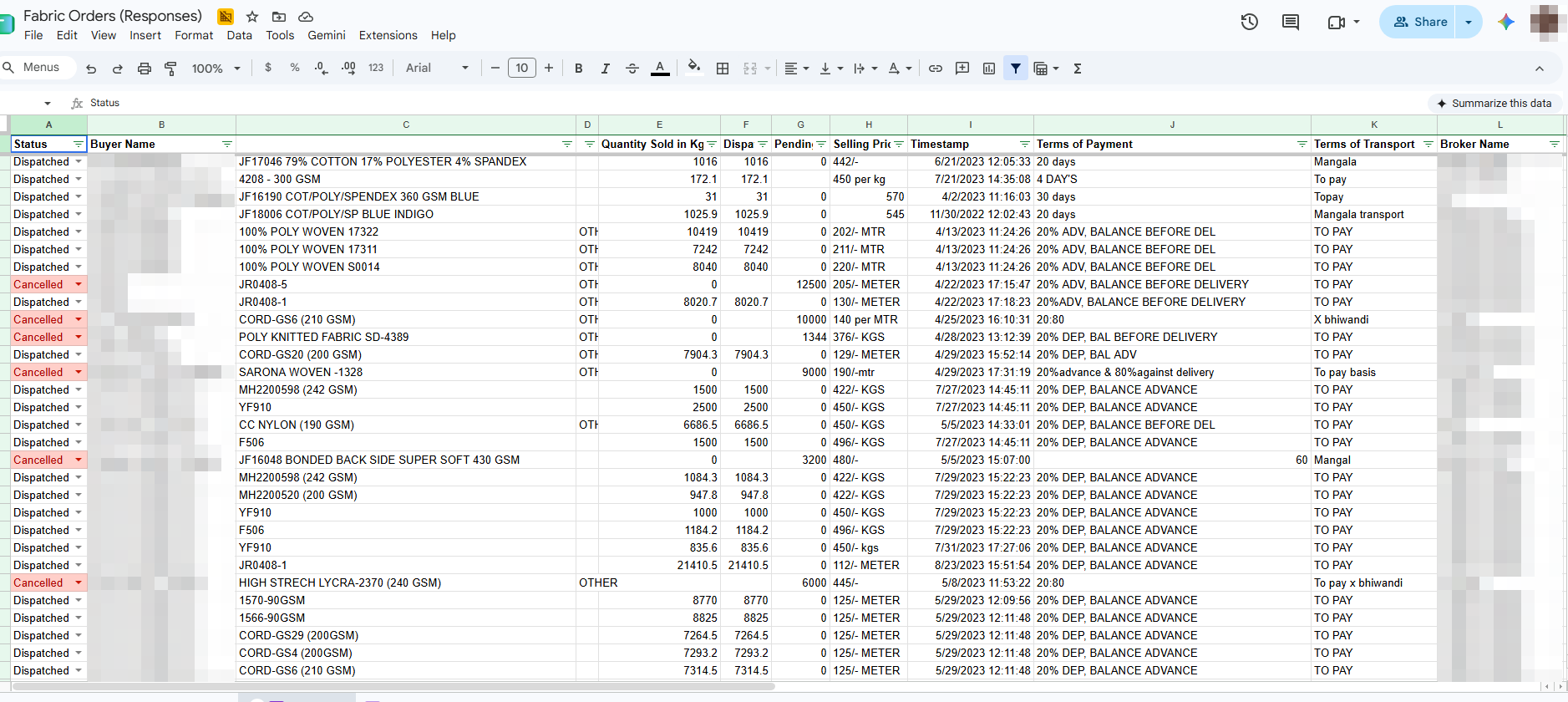
KilledThe sheet the business actually ran on. Read the price column — 442/-, 450 per kg, 205/- METER, 190/-mtr — then the transport column: To pay, Topay, TO PAY, To pay basis. Buyer and broker names pixelated for publication.
Catch the structure at the moment the order is created
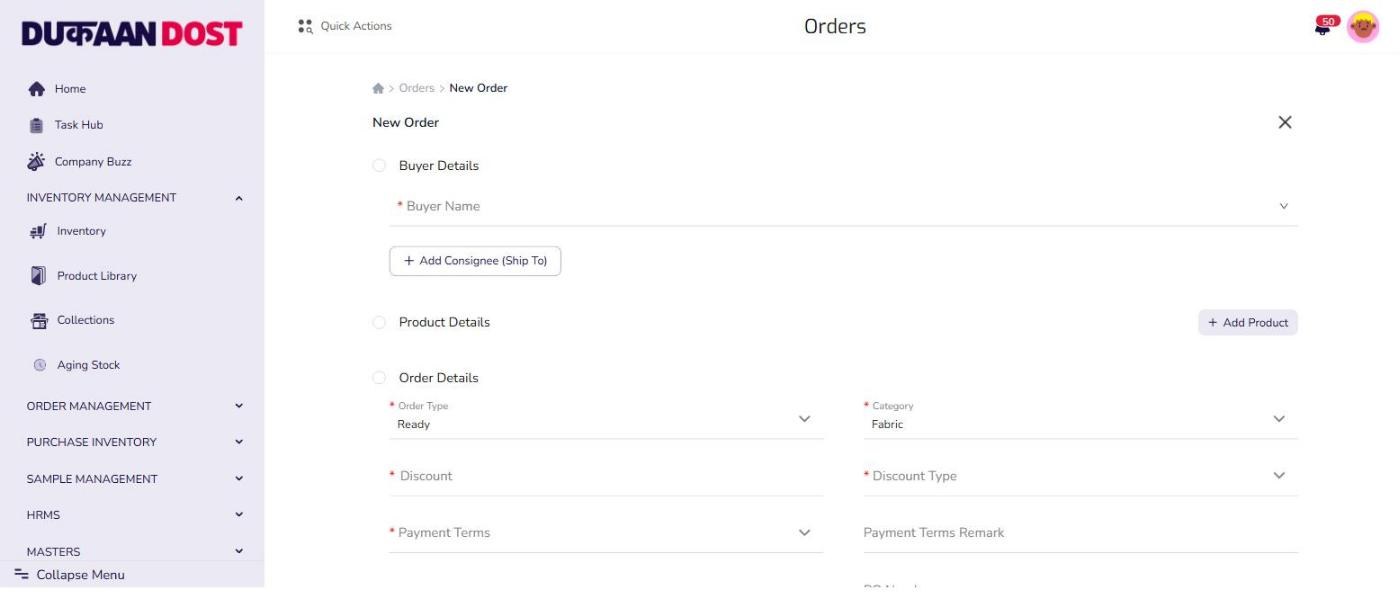
Everything downstream — dispatch, invoicing, stock, receivables — depends on the order being right, so the order form is where the effort went. Buyer, product, quantity, discount, payment terms and delivery date are captured as fields with rules rather than as text somebody would interpret later. The paper form asked for the same information. The difference is that this one refuses an order that does not make sense, at the only moment when fixing it is cheap.
The same questions the paper form asked, with rules attached
Stock stops being a file and becomes a place you look
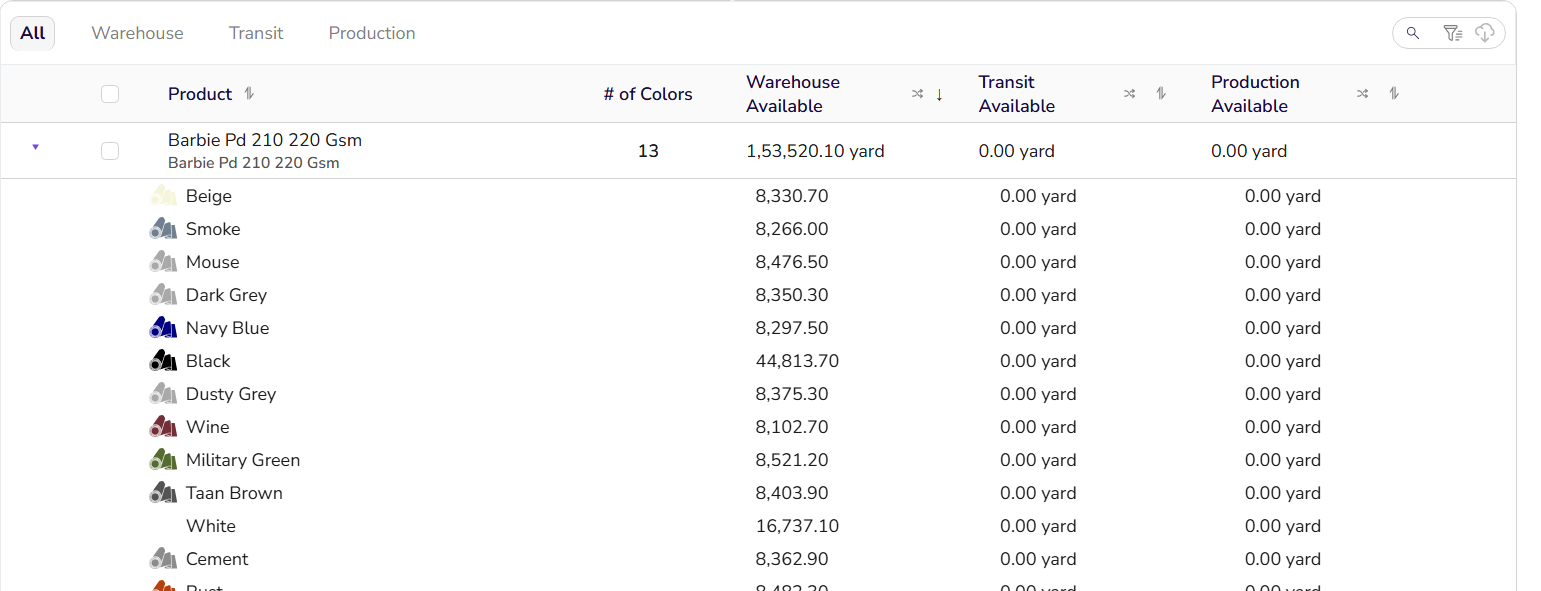
Textile stock is not one number. A quality exists in a dozen colours, each colour in individual rolls, and every roll is somewhere — warehouse, in transit, or on the production floor. The spreadsheet flattened all of that into a single figure per product, which is exactly why it was always wrong. Modelling stock at the resolution the business works at meant the number stopped needing interpretation.
One quality, thirteen colours, three states — the detail a single cell used to hide
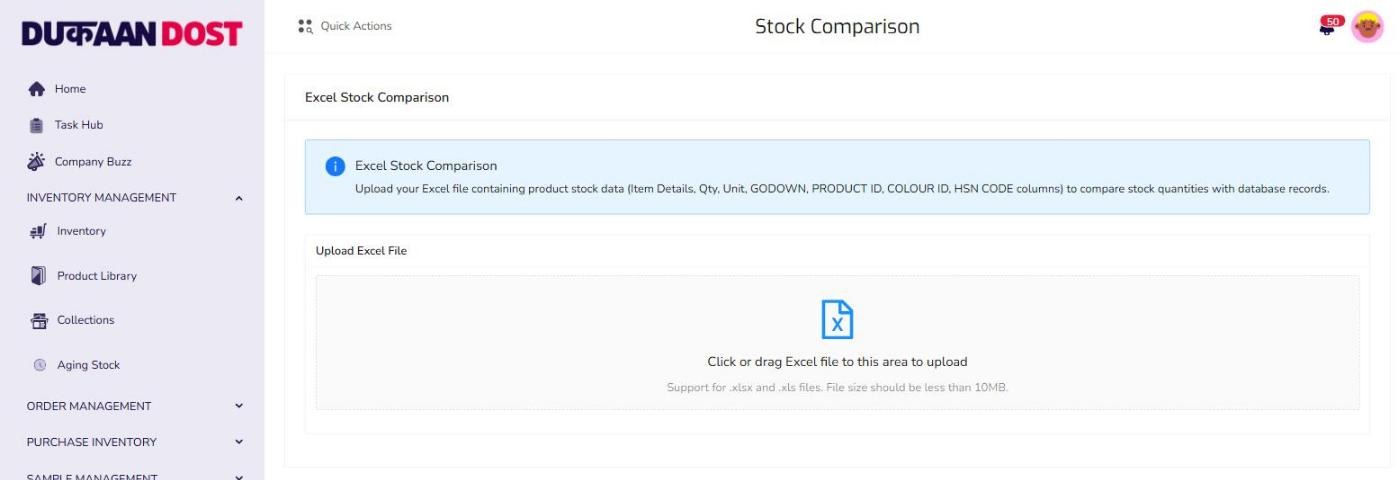
Reconcile against the spreadsheets instead of banning them
Spreadsheets did not disappear when the ERP arrived, and pretending they would have guaranteed a shadow system. So the ERP accepts them: upload the sheet and it compares every line against the database and reports where the two disagree. That turned a political problem into an engineering one. Nobody had to be told to stop using Excel — they stopped finding differences worth arguing about.
The old system of record, demoted to an input
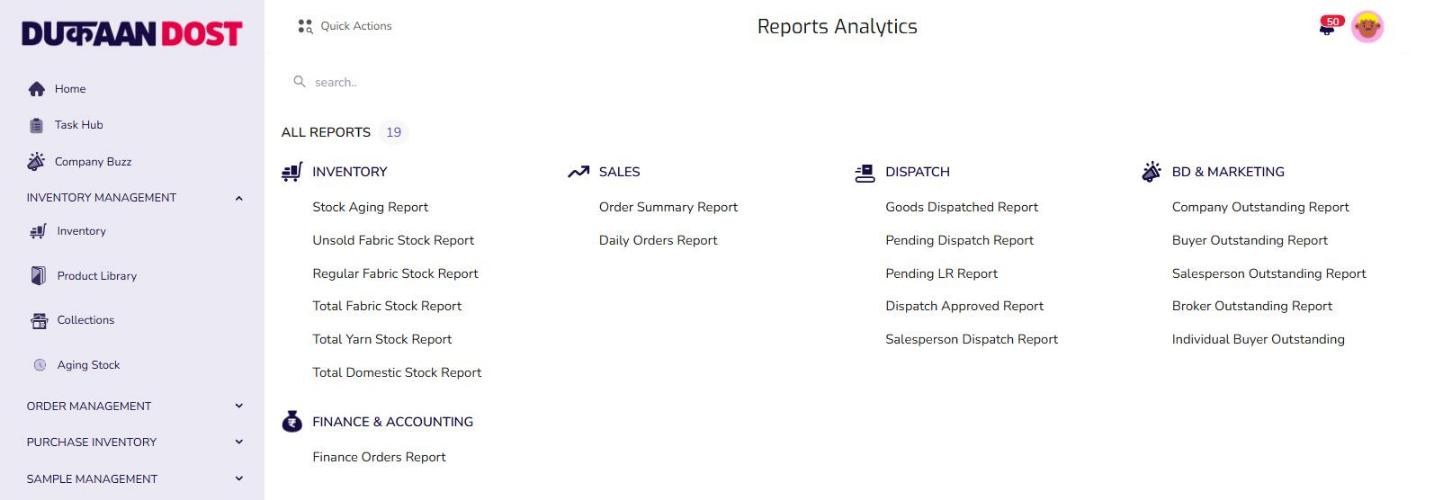
Turn the recurring judgement calls into reports
Which stock has gone stale, who is overdue, what shipped last month — these were questions someone answered by reading a sheet and thinking hard. They are not difficult questions; they were just expensive to ask. Nineteen of them are reports now, so the answer arrives the same way every time and the argument moves on to what to do about it.
Nineteen standing questions, answered the same way every time
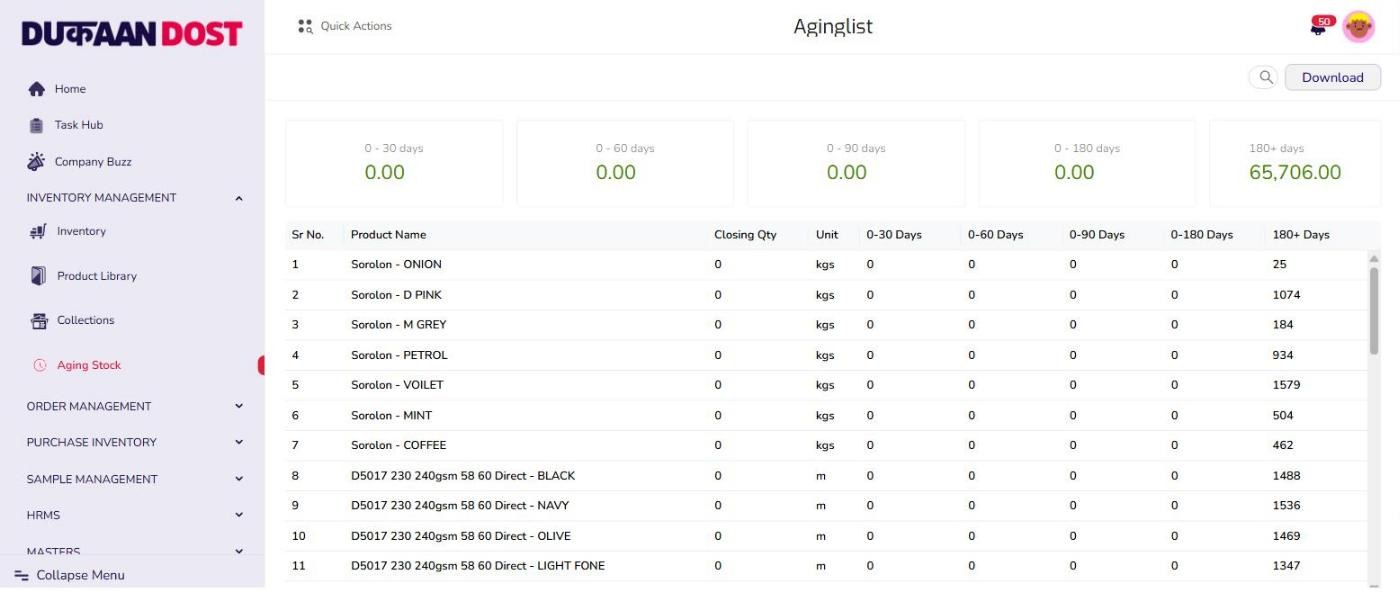
Put a number on the stock nobody was looking at
A spreadsheet showing current quantity cannot show you age, so fabric that had been sitting for six months looked identical to fabric that arrived last week. Ageing buckets were the first thing the system told the business that it did not already know, and the first time the ERP settled an argument on its own.
The question the spreadsheet could not be asked
Where it got hard
The parts that fought back
The old process was load-bearing
The spreadsheet encoded years of exceptions nobody had written down — this buyer is billed differently, that quality is measured in yards. Every one of them surfaced as a bug in the new system, and each had to be found by shipping and getting complaints.
People trusted the sheet, not the screen
For months the correct answer to which is right was the ERP, and the reason people checked the sheet anyway was that they had never been given evidence to stop. Reconciliation was as much about trust as correctness.
You cannot pause a business to build
Every module had to go in beside a working process rather than in place of it. That constraint is the same one that later decided how we handled the legacy accounting system.
Scope has no natural edge
Orders led to dispatch, dispatch to receivables, receivables to reporting, and each one genuinely blocked the next. Deciding what not to build was harder than building.
What I learned
01
A spreadsheet is not a bad database. It is an excellent document pretending to be a database, and the gap between those two things is where the errors live.
02
Do not ban the old tool. Make the new system read it, show the differences, and let people stop using it on their own.
03
Model the business at the resolution it actually works at. A roll of fabric is not a row in a stock total, and flattening it is where the number starts lying.
04
The task worth automating is the one somebody does by hand every week without noticing it is work.